加载中...
Hive查询进阶
发表于:2021-12-12 | 分类: Hive

HiveQL数据查询进阶

本章要点

  • Hive 内置函数
  • Hive 构建搜索日志分析系统
  • Sqoop 应用与开发

Hive 内置函数

Hive 内置函数就是Hive 中可以直接使用的函数,首先查看一下有哪些函数

1
2
3
4
5
6
7
8
9
10
11
12
13
14
15
16
17
18
19
20
21
22
23
24
25
26
27
28
29
30
31
32
show functions;
INFO : OK
+------------------------------+
| tab_name |
+------------------------------+
| ! |
| != |
| $sum0 |
| % |
| & |
| * |
| + |
| - |
| / |
| < |
| <= |
| <=> |
| <> |
| = |
| == |
| > |
| >= |
| ^ |
| abs |
| acos |
| add_months |
| aes_decrypt |
| aes_encrypt |
| and |
...
+------------------------------+
289 rows selected (0.494 seconds)

其中常用的如avg求平均,concat连接函数,count统计等。内置函数可以被分成:数学函数、字符函数、收集函数、转换函数、日期函数、条件函数、聚合函数以及表生成函数。

数学函数

1
2
3
4
5
6
7
8
9
10
11
12
13
14
15
16
17
18
19
20
21
22
23
24
25
26
27
28
29
30
31
32
33
34
35
36
37
38
39
40
41
42
43
44
45
46
47
48
49
50
51
52
53
54
55
56
57
58
59
60
61
62
63
64
65
66
67
68
69
#加法
select 10+10;
INFO : OK
+------+
| 20 |
+------+
1 row selected (1.324 seconds)

#减法
select 15-3;
INFO : OK
+------+
| 12 |
+------+
1 row selected (0.564 seconds)

#乘除*/
select 6*6;
INFO : OK
+------+
| 36 |
+------+
1 row selected (0.867 seconds)
select 36/6;
INFO : OK
+------+
| 6.0 |
+------+
1 row selected (0.734 seconds)

#round四舍五入
select round(88.999,2),round(78.600,1), round(55.776,2);
INFO : OK
+--------+-------+--------+
| 89.00 | 78.6 | 55.78 |
+--------+-------+--------+
1 row selected (0.505 seconds)

#ceil向上取整
select ceil(84.5);
INFO : OK
+------+
| 85 |
+------+
1 row selected (0.542 seconds)

#floor向下取整
select floor(45.9);
INFO : OK
+------+
| 45 |
+------+
1 row selected (0.535 seconds)

#pow 平方函数
select pow(2,3);
INFO : OK
+------+
| 8.0 |
+------+
1 row selected (0.357 seconds)

#pmod 取模函数
select pmod(9,8);
INFO : OK
+------+
| 1 |
+------+
1 row selected (0.242 seconds)

字符函数

1
2
3
4
5
6
7
8
9
10
11
12
13
14
15
16
17
18
19
20
21
22
23
24
25
26
27
28
29
30
#lower转小写
select lower("FJKNXCYT");
+-----------+
| fjknxcyt |
+-----------+
#upper转大写
select upper("asdjnkgbasd");
+--------------+
| ASDJNKGBASD |
+--------------+
#length字符串长度
select length("hadoop");
+------+
| 6 |
+------+
#concat字符拼接
select concat("hadoop", "&hive");
+--------------+
| hadoop&hive |
+--------------+
#substr取子串(从8开始取5个)
select substr("hadoop spark hive", 8, 5);
+--------+
| spark |
+--------+
#trim去除前后空格
select trim(" hadoop ");
+---------+
| hadoop |
+---------+

转换函数

1
2
3
4
5
#cast类型转换函数
select cast (88 as double);
+-------+
| 88.0 |
+-------+

日期函数

1
2
3
4
5
6
7
8
9
10
#year month day 分别获取年月日
select year("2021-10-08 18:40:24"), month("2021-10-08 18:40:24"), day("2021-10-08 18:40:24");
+-------+------+------+
| 2021 | 10 | 8 |
+-------+------+------+
#to_date返回字段中日期部分
select to_date("2021-10-08 18:40:24");
+-------------+
| 2021-10-08 |
+-------------+

条件函数

1
2
3
4
5
6
7
8
9
#case A when B then C when D then E else F end;
select ts, uid, rank, case rank when "2" then rank+1 else rank-1 end from sogou.sogou_liangjian;
+-----------------+-----------------------------------+-------+------+
| ts | uid | rank | _c3 |
+-----------------+-----------------------------------+-------+------+
| 20111230104333 | 53a3b5132bd6af7d324f3fd55d7153ba | 3 | 2 |
| 20111230104334 | 966a6bf4c4ec1cc693b6e40702984235 | 4 | 3 |
| 20111230104334 | ae55d5e4b4f29a1221816a121e087567 | 2 | 3 |
+-----------------+-----------------------------------+-------+------+

聚合函数

1
2
3
4
5
6
7
8
9
10
11
12
13
14
15
16
17
18
19
20
21
22
23
24
25
26
27
#count返回行数
select count(*) from sogou.sogou_xj;
+-------+
| 1330 |
+-------+
#sum求和
select sum(orders) as ordersum from sogou.sogou_xj;
+-----------+
| ordersum |
+-----------+
| 2043 |
+-----------+
#min列最小值
select min(orders) from sogou.sogou_xj;
+------+
| 1 |
+------+
#max列最大值
select max(rank) from sogou.sogou_xj;
+------+
| 10 |
+------+
#avg列平均值
select avg(rank) from sogou.sogou_xj;
+---------------------+
| 2.9225563909774435 |
+---------------------+

Hive 构建搜索日志分析系统

数据预处理(Linux环境)

  1. 查看数据
1
2
[root@hdp-1 hive]# wc -l sogou.500w.utf8 
5000000 sogou.500w.utf8
  1. 数据拓展
    将用户访问的时间拆分成,年月日小时字段,为后面创建分区表做准备,编写一个shell脚本实现此功能。
1
2
3
4
5
6
7
8
9
10
11
vi pre.sh 

#!/bin/bash
infile=$1
outfile=$2
awk -F '\t' '{print $0"\t"substr($1,1,4)"\t"substr($1,5,2)"\t"substr($1,7,2)"\t"substr($1,9,2)}' $infile > $outfile

chmod +x pre.sh
sh pre.sh ./sogou.500w.utf8 ./sogou.500w.utf8.ext
less sogou.500w.utf8.ext

  1. 数据加载
    将数据放到HDFS上
1
2
hdfs dfs -mkdir -p /usr/local/hive/
hdfs dfs -put ./sogou.500w.utf8.ext /usr/local/hive/

基于Hive 构建日志的数据仓库

启动Hadoop集群,打开Hive客户端

  1. 基本操作
1
2
3
4
5
6
7
8
9
10
11
12
13
14
15
16
17
18
19
20
21
22
23
24
25
26
27
28
29
30
31
32
33
34
35
36
37
38
show databases;
+---------------------+
| database_name |
+---------------------+
| default |
| information_schema |
| sogou |
| sys |
+---------------------+
create database if not exists sogou;
use sogou;
show tables;
+------------------+
| tab_name |
+------------------+
| sogou_500w |
| sogou_liangjian |
| sogou_xj |
| sogou_xj_backup |
+------------------+
#创建外部表sogou_0936加载sogou.500w.utf8的数据
create external table if not exists sogou.sogou_0936(ts string,uid string,keyword string, rank int, orders int, url string) row format delimited fields terminated by '\t' stored as textfile location '/usr/local/hive/raw/';
#创建外部表sogou_ext加载sogou.500w.utf8.ext的数据
create external table if not exists sogou.sogou_ext(ts string,uid string,keyword string, rank int, orders int, url string) row format delimited fields terminated by '\t' stored as textfile location '/usr/local/hive/ext/'
#查看数据没问题
select * from sogou_0936 limit 10;
select * from sogou_ext limit 10;
desc sogou_0936;
+-----------+------------+----------+
| col_name | data_type | comment |
+-----------+------------+----------+
| ts | string | |
| uid | string | |
| keyword | string | |
| rank | int | |
| orders | int | |
| url | string | |
+-----------+------------+----------+
  1. 创建分区表
1
2
3
4
5
6
7
8
9
10
11
12
13
14
15
16
17
18
19
20
21
22
#创建分区表
create external table if not exists sogou.sogou_partition(ts string,uid string,keyword string, rank int, orders int, url string) partitioned by (year int, month int, day int, hour int ) row format delimited fields terminated by '\t' stored as textfile;
#查看表
show tables;
+------------------+
| tab_name |
+------------------+
| sogou_0936 |
| sogou_500w |
| sogou_ext |
| sogou_liangjian |
| sogou_partition |
| sogou_xj |
| sogou_xj_backup |
+------------------+
#最后向分区表中导入数据
#开启动态分区非严格模式
set hive.exec.dynamic.partition.mode=nonstrict;
#禁用矢量运行
set hive.vectorized.execution.enabled=false;
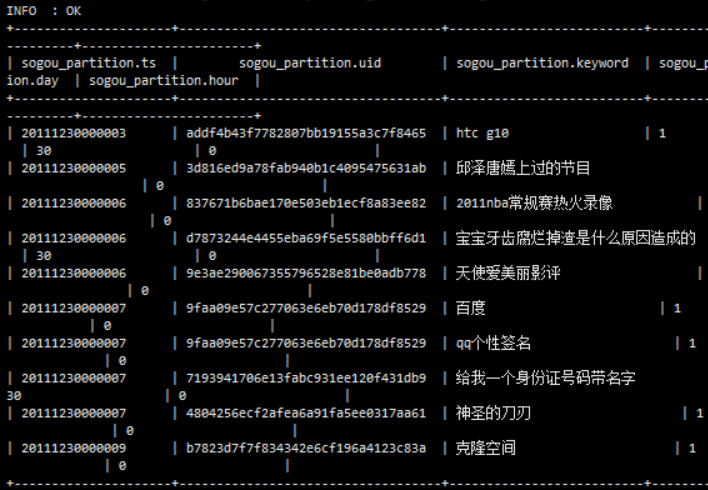
insert overwrite table sogou.sogou_partition partition(year, month, day, hour) select * from sogou.sogou_ext;
#查看数据

image-20211008220145786

image-20211008220222053

image-20211008220457507

数据分析需求(1):条数统计

1
2
#查询总数据条数
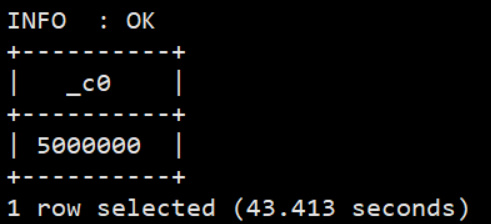
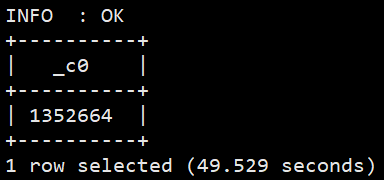
select count(*) from sogou.sogou_ext;

image-20211008221558788

1
2
#查询关键词非空数据
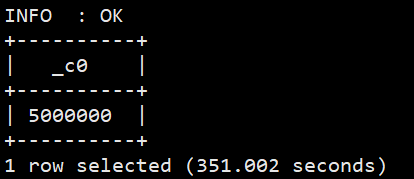
select count(*) from sogou.sogou_ext where keyword is not null and keyword != '';

image-20211009083441029

1
2
3
#无重复总条数(根据ts, uid, keyword, url)
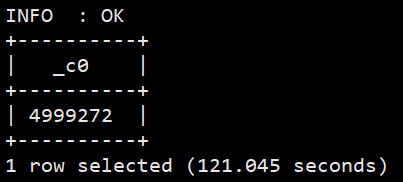
select count(*) from (select uid,count(*) from sogou.sogou_ext group by ts,uid,keyword,url having count(*) = 1 ) t;
#需要给子表起个名

image-20211009114925786

1
2
#统计独立uid条数
select count(distinct(uid)) from sogou.sogou_ext;

image-20211009115150331

数据分析需求(2):关键词分析

1
2
3
4
#查询关键词平均长度
select avg(a.cnt) from (select size(split(keyword,' s+')) as cnt from sogou.sogou_ext) a;
#由于split函数不支持矢量计算,需要先关闭该功能
set hive.vectorized.execution.enabled=false;

image-20211009122646106

1
2
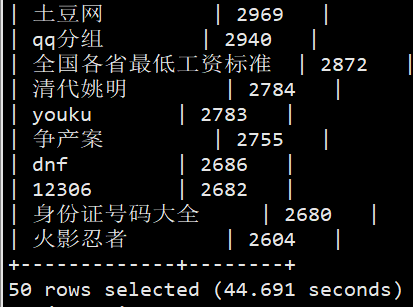
#查询频度排名前50
select keyword,count(*) as cnt from sogou.sogou_ext group by keyword order by cnt desc limit 50;

image-20211009122909785

数据分析需求(3):UID分析

1
2
3
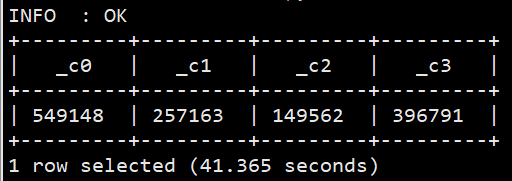
#为了统计UID的查询次数分布(查询1次的UID个数…查询n次的UID个数),这里我们列出查询1次、2次、3次和大于3次的UID个数
select sum(if(uids.cnt=1,1,0)),sum(if(uids.cnt=2,1,0)), sum(if(uids.cnt=3,1,0)), sum(if(uids.cnt>3,1,0)) from (select uid, count(*) as cnt from sogou.sogou_ext group by uid) uids;

image-20211009123459384

1
2
#统计UID平均查询次数
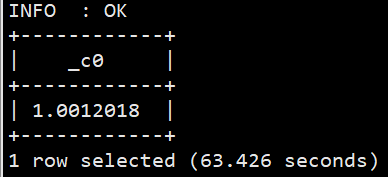
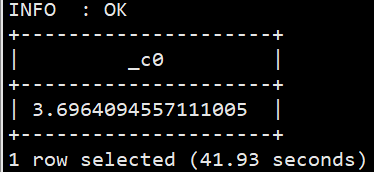
select sum(a.cnt)/count(a.uid)from(select uid,count(*)as cnt from sogou.sogou_ext group by uid) a;

image-20211009124613760

1
2
3
4
5
6
7
8
#统计查询次数大于2次的用户占比:
#先统计B:UID总数
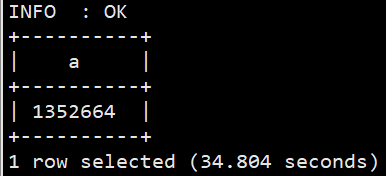
select count(distinct(uid)) as A from sogou.sogou_ext;
#统计查询A:次数大于2的UID个数
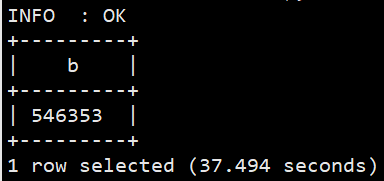
select count(a.uid) as B from (select uid,count(*) as cnt from sogou.sogou_ext group by uid having cnt>2)a;
#占比结果是C=B/A
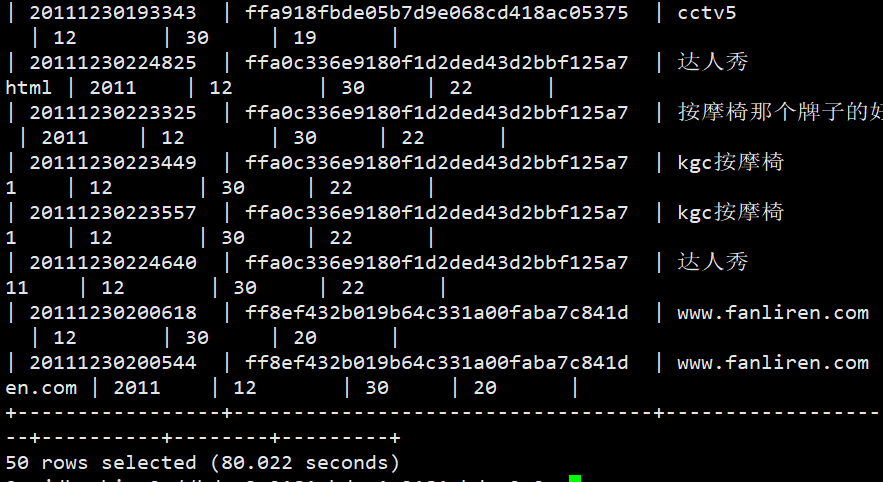
#查询次数大于2次的数据如下
select b.* from(select uid,count(*) as cnt from sogou.sogou_ext group by uid having cnt >2) a join sogou.sogou_ext b on a.uid=b.uid limit 50;

image-20211009124722432

image-20211009124814645

image-20211009125148463

数据分析需求(4):用户行为分析

1
2
3
4
5
#点击次数与rank之间的关系
select count(*) from sogou.sogou_ext where rank < 11;
+----------+
| 4999869 |
+----------+
1
2
3
4
5
#直接输入url进行查询的比例
select count(*) from sogou.sogou_ext where keyword like'%www%';
+--------+
| 73979 |
+--------+
1
2
3
4
5
#用户访问的网站包含用户输入的url类型关键词
select sum(if(instr(url,keyword)>0,1,0)) from (select * from sogou.sogou_ext where keyword like '%www%')a;
+--------+
| 27561 |
+--------+
1
2
3
4
5
6
7
8
9
#查询独立用户行为
select uid, count(*)as cnt from sogou.sogou_ext where keyword like'%仙剑奇侠传%' group by uid having cnt > 3;
+-----------------------------------+------+
| uid | cnt |
+-----------------------------------+------+
| 265f1fa26029c058c695ecc7ee4bad01 | 4 |
| 2b136abffd8f0dd38d97a52a7e50f7fb | 4 |
| 40aa046859609c25b3914ac9f2735c5c | 5 |
| 653d48aa356d5111ac0e59f9fe736429 | 9 |

Sqoop 应用与开发

在实际开发中我们经常会碰到这样一种需求,即大数据平台处理完的数据需要导入关系型数据库,反之关系型数据库中的数据也需要导入大数据平台,为此大数据平台为我们提供了Sqoop工具来解决这一需求。

Sqoop简介

Sqoop是Apache开源的顶级项目之一,用于在ApacheHadoop和关系型数据库等结构化数据存储之间高效传输大容量数据的工具。也就是说,Sqoop是一款类ETL工具,主要负责将大数据平台处理完的数据导入关系型数据库中,或者将关系型数据库中的数据带入大数据平台。

Sqoop安装部署

安装环境
在安装Sqoop之前确保hadoop正确启动,运行,mysql正常运行。
解压安装

1
2
3
4
5
tar -zxvf sqoop-1.4.7.bin__hadoop-2.6.0.tar.gz
mv sqoop-1.4.7.bin__hadoop-2.6.0 /usr/local/sqoop

#更改目录权限
chown hadoop:hadoop -R /usr/local/sqoop/

配置Sqoop

  1. 配置MySQL连接器
    Sqoop底层通过JDBC的方式访问MySQL数据库,所以需要把MySQL数据库的驱动程序复制到Sqoop的依赖包,这里可以使用hive的mysql驱动(如果有)
1
cp /usr/local/hive/lib/mysql-connector-java-5.1.32.jar  /usr/local/sqoop/lib/
  1. 配置环境变量
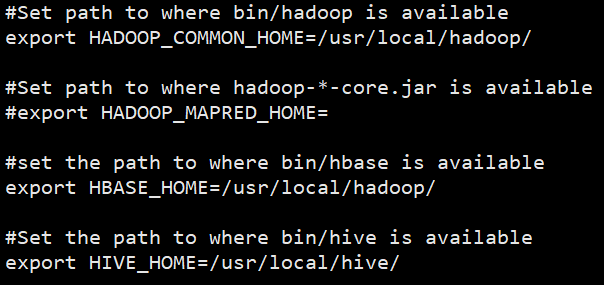
    进入到Sqoop的conf目录下,找到sqoop-env-template.sh文件,重命名为sqoop-env.sh,打开进行环境变量的配置
1
2
cp /usr/local/sqoop/conf/sqoop-env-template.sh  /usr/local/sqoop/conf/sqoop-env.sh
vi /usr/local/sqoop/conf/sqoop-env.sh

image-20211102175209476
3. 将commons-log.jar包放在lib下。
https://mirrors.tuna.tsinghua.edu.cn/apache//commons/lang/binaries/commons-lang-2.6-bin.zip

1
2
mv commons-lang-2.6.jar /usr/local/sqoop/lib/
chown hadoop:hadoop /usr/local/sqoop/lib/commons-lang-2.6.jar

Sqoop将Hive表中的数据导入MySQL

实验条件
MySQL正常启动
构建MySQL数据库中的表

  1. 登录MySQL
    登录MySQL的命令
1
mysql -u root -p
  1. 创建数据库
1
2
create database if not exists test;
Query OK, 1 row affected (0.00 sec)
  1. 创建表
1
2
3
4
5
6
7
8
9
10
11
create table  test.uid_cnt (uid varchar(255) default null,cnt int(11) default null);
Query OK, 0 rows affected (0.05 sec)

desc test.uid_cnt;
+-------+--------------+------+-----+---------+-------+
| Field | Type | Null | Key | Default | Extra |
+-------+--------------+------+-----+---------+-------+
| uid | varchar(255) | YES | | NULL | |
| cnt | int(11) | YES | | NULL | |
+-------+--------------+------+-----+---------+-------+
2 rows in set (0.15 sec)

构建Hive数据仓库中的表

  1. 进入Hive
  2. 创建Hive中的表sogou.sogou_uid_cnt
1
create table sogou.sogou_uid_cnt(uid string,cnt int) row format delimited fields terminated by '\t';
  1. 向表中写入数据
1
2
insert into table sogou.sogou_uid_cnt select uid,count(*) from sogou_500w group by uid;
select * from sogou.sogou_uid_cnt limit 10;

使用Sqoop工具将Hive的数据导入MySQL

  1. 导入命令
1
/usr/local/sqoop/bin/sqoop export --connect jdbc:mysql://master:3306/test --username root --password 123456 --table uid_cnt --export-dir 'hdfs://master:9000/user/hive/warehouse/sogou.db/sogou_uid_cnt' --fields-terminated-by '\t'
  1. 以上命令的解释如下
    sqoop export表示数据从Hive复制到MySQL数据库中;–connect jdbc:mysql://master:3306/test表示连接MySQL数据库test;–username root表示连接MySQL数据库的用户名;–password 12345表示连接MySQL数据库的密码;–table uid_cnt表示MySQL中的表即将被导入的表名称;–export-dir '/user/hive/warehouse/sogou.db/uid_cnt’表示Hive中被导出的文件路径;–fields-terminated-by '\t’表示Hive中被导出的文件字段的分隔符。

  2. 以上命令成功运行之后会在控制台打印输出如下结果

  3. 最后,验证结果数据。
    登录MySQL数据库,查询库test的表uid_cnt中是已经有了数据,如果有数据说明Sqoop工具将Hive中的数据成功导入了MySQL。

1
2
3
select * from test.uid_cnt limit 10;

select count(*) from test.uid_cnt;

使用Sqoop工具将MySQL中的数据导入Hive表
前面我们成功地将Hive表sogou_uid_cnt中的数据导入MySQL数据库的uid_cnt表,反之,我们再利用Sqoop工具将表uid_cnt中的数据导入表sogou_uid_cnt2中

  1. 首先,在Hive中创建表sogou_uid_cnt2
1
2
create table sogou.sogou_uid_cnt2(uid string,cnt int) row format delimited fields terminated by '\t';
describe sogou.sogou_uid_cnt2;
  1. 然后,我们就可以使用Sqoop工具将MySQL中表uid_cnt的数据导入Hive的表sogou_uid_cnt
    在导入数据之前,/user/hive/warehouse/sogou.db/sogou_uid_cnt2已经存在,我们将其删除。
1
2
3
hdfs dfs -rmdir /user/hive/warehouse/sogou.db/sogou_uid_cnt2

/usr/local/sqoop/bin/sqoop import --connect jdbc:mysql://master:3306/test --username root --password 123456 --table uid_cnt --target-dir /user/hive/warehouse/sogou.db/sogou_uid_cnt2 --fields-terminated-by '\t' -m 1
  1. 进入Hive进行验证
1
select * from sogou.sogou_uid_cnt2 limit 10;
上一篇:
MapReduce二次排序
下一篇:
(Hive)汽车销售数据分析系统实战开发
本文目录
本文目录